Polymarket app
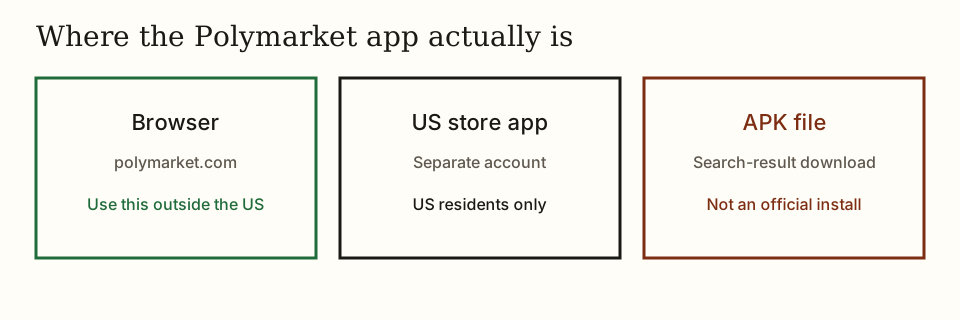
Outside the US, use polymarket.com in the browser. Do not install a Polymarket APK from a third-party site. The US app is a different account.
Open Polymarket in the browser
- No sideload APK
- Browser outside the US
- US app is separate
- 18+ only
Review / App
Polymarket APK
Polymarket does not publish an APK for a search result or a file host. An APK named Polymarket from a third-party site is not an official install. Outside the United States, Polymarket is polymarket.com in the phone browser. In the United States, the install is the store listing published by Polymarket, and only if that app shows the account as eligible. The Help Center article dated 25 Jun 2026 is the product-split source.
| polymarket.com | Polymarket US app | |
|---|---|---|
| Who | International users, outside restricted places | US residents |
| Install | No install. Any modern browser. | Separate app. Accounts are not connected to the website. |
| Support | [email protected] | [email protected] |
| Android | Use the website | Help Center on 25 Jun 2026 said the Android app was coming soon. A Play listing for com.polymarket.android was updated 18 Nov 2026. |
| What you see | What it is |
|---|---|
| polymarket.com in Safari or Chrome | The international product. No install. |
| App Store or Play listing whose developer is Polymarket | The US product, if the store shows it for your account. |
| An APK, XAPK, or "latest Polymarket.apk" on a file host | Not an official install. Close it. |
| A page that asks for a seed phrase to unlock the app | Not Polymarket. Staff do not ask for the key. |
Open Polymarket in the browser
Which Polymarket app to open
Polymarket outside the US is the website. Polymarket US is the store app, and the two do not share an account. Android outside the US stays in the browser.
- If you are outside the US, stay on the website. No install is required. Add polymarket.com to the home screen if you want an icon. That shortcut still opens the browser.
- If you are in the US, the website will not take a deposit or a new trade. Use the Polymarket US app. It is a different product with a different login. The Help Center article dated 25 Jun 2026 lists iOS as the US app and Android as coming soon. A Google Play listing for com.polymarket.android was updated 18 Nov 2026. Install only if that listing is the one Polymarket published and the app accepts you.
- On Android outside the US, use the browser. Do not hunt for an APK.
A Polymarket home-screen icon is still the website
On iPhone, Safari's Share then Add to Home Screen opens polymarket.com. On Android, Chrome's menu then Add to Home screen does the same. That icon does not install a second Polymarket app, does not create a second balance, and is not a Polymarket APK. Login stays Google, the email code, or a wallet signature, the same three methods as Polymarket login.
Polymarket US, the store app, asks for Apple or Google and then the identity check. A deposit in Polymarket US does not show on polymarket.com, and a polymarket.com deposit does not show in Polymarket US. If the store has no Polymarket listing for that country, the path is the browser.
Open Polymarket on a phone
Polymarket on a phone outside the US starts in the browser at polymarket.com. Polymarket US starts in the store app. The deposit has to match the product that is open.
- iPhone or Android, outside the US: open Safari or Chrome and type polymarket.com. Do not follow an ad that lands on a lookalike host.
- Tap Log In. Google, the email code, and a wallet signature are the website methods, listed on the login page.
- A US App Store install uses its own sign-up, Google or Apple, then the identity check on the age and KYC page.
- Fund the product you actually opened. A deposit on the website does not appear in the US app, and the reverse is also true.
If the phone will not open a Polymarket market
Polymarket refusing a buy on a phone is usually a country block, a missing store listing, a fake APK, or a visible price with buying turned off. Each one has a different fix.
- The website says trading is unavailable. Your IP is in a restricted place. Closing an existing position can still be allowed. A new order will not. A VPN does not make it allowed.
- The store has no Polymarket app for your country. That is expected outside the US product. Use the browser.
- You installed an APK and it asks for a key or a code from email. Delete it. The real login never needs the seed phrase.
- You can see prices and cannot buy. Read how a share pays $1 only after the account is the one your country is allowed to use. Access rules are on the legal page.
The Polymarket app in short
Polymarket outside the US is polymarket.com in the browser, not an APK. Polymarket US is a separate store app with a separate account. The Help Center split is dated 25 Jun 2026, and the Play listing com.polymarket.android was checked 22 Nov 2026.
Questions
Is there an official Polymarket APK?
Polymarket does not publish an APK for sideloading. Outside the US, Polymarket is polymarket.com in a browser. US users use Polymarket US from the store listing Polymarket published.
Does the Polymarket app share a website login?
No. Polymarket US and polymarket.com are separate products. Each has its own account and its own support inbox. A login on one does not open the other.
Where do I install Polymarket on Android?
Outside the US, Polymarket on Android is the website, with no install. Inside the US, Polymarket US is the official store listing, and only if the app accepts the account. Skip APK files.
Does Add to Home Screen install the Polymarket app?
No. Add to Home Screen opens polymarket.com in the browser. That icon is not a Polymarket APK and it is not Polymarket US. The balance stays the website balance.
Product split: Website vs app, Polymarket Help Center, 25 Jun 2026. Play listing date is from the public Google Play page checked 22 Nov 2026.